Improving the Marquage Order Intake Process
Adding product-specific guidance to reduce ambiguity at intake and support clearer downstream execution.
Process Improvement • Service Design • Information Design • Stakeholder Enablement
Role: Initiative Lead / Process Designer
Scope: Intake Process Improvement · Information Design · Stakeholder Enablement
Stakeholders: Sales Associates · Coordinators · Painters · Workshop Leadership
Timeline: [Month Year – Month Year]
Overview
Marquage orders move through several stakeholders before reaching the workshop. Sales associates capture a client's customization request, coordinators process the information, and painters ultimately rely on that documentation to execute the request.
Through my work in the workshop, I noticed that some recurring questions and delays originated much earlier in this process, particularly around product-specific placement and information that wasn't always obvious to the person completing the form.
Rather than replacing the existing intake process, I improved the existing forms by introducing targeted guidance where ambiguity was most likely to occur.
The updated forms incorporated product-specific diagrams, clearer placement guidance, and relevant product characteristics to help sales associates capture more complete information while the client was still present.
The Challenge
The form captured the request, but didn't always provide enough context to capture it clearly.
The existing intake process already worked.
The problem was that certain decisions required knowledge that sales associates couldn't reasonably be expected to know or remember for every product.
For example, placement possibilities could vary depending on the item, and certain product characteristics could affect the information that should be communicated to a client.
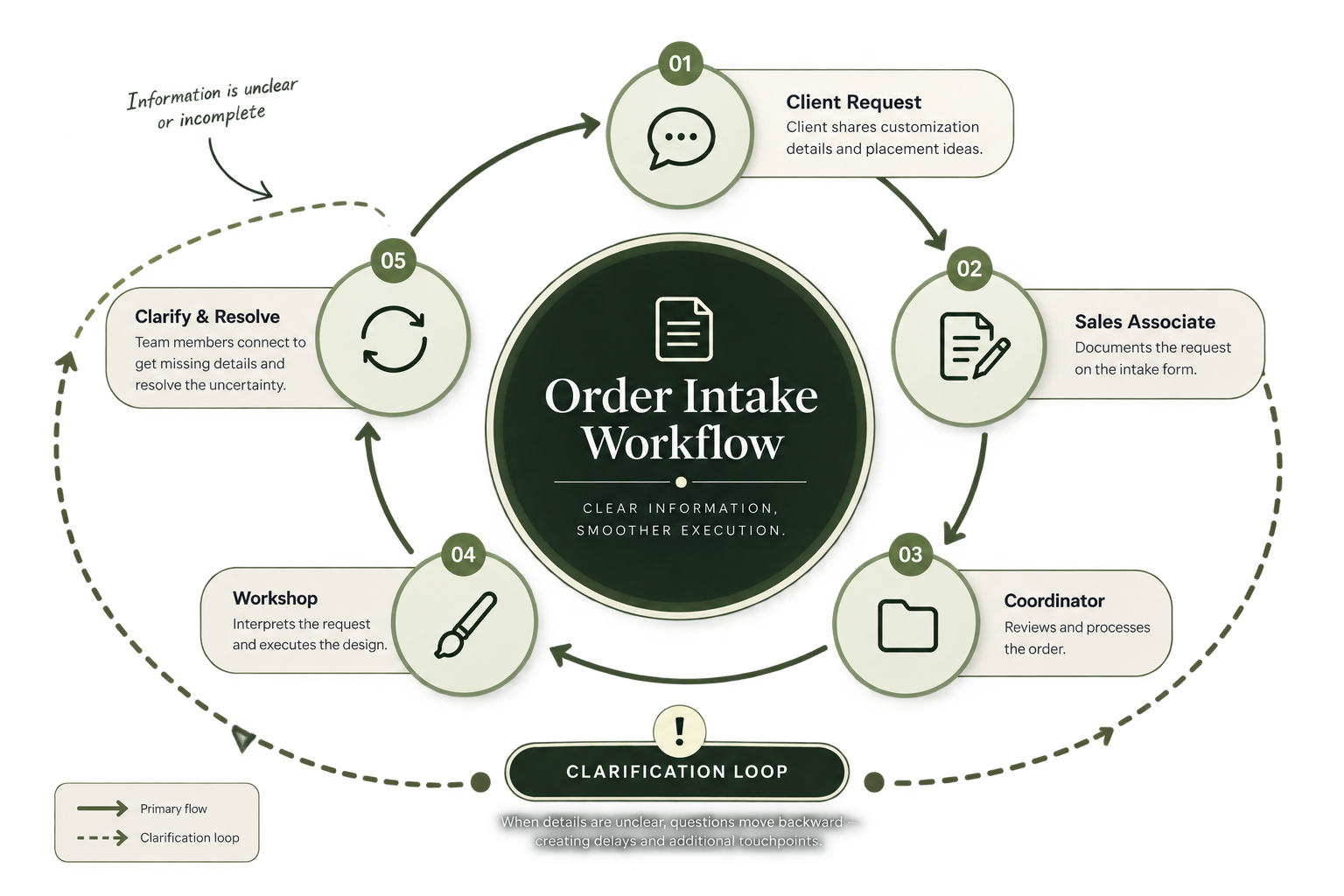
When that context wasn't available during intake, ambiguity traveled downstream.
Client → Sales Associate → Coordinator → Workshop
By the time the workshop identified missing or unclear information, the client might no longer be readily available.
That could turn a small question into several additional communication steps.
Identifying the Opportunity
Because I worked at the downstream end of the process, I had visibility into the types of information that repeatedly created questions during execution.
Instead of treating those questions individually, I looked for patterns:
What information are we repeatedly asking for?
What does the workshop know that the person completing the form may not?
Which questions could be prevented if that knowledge were available earlier?
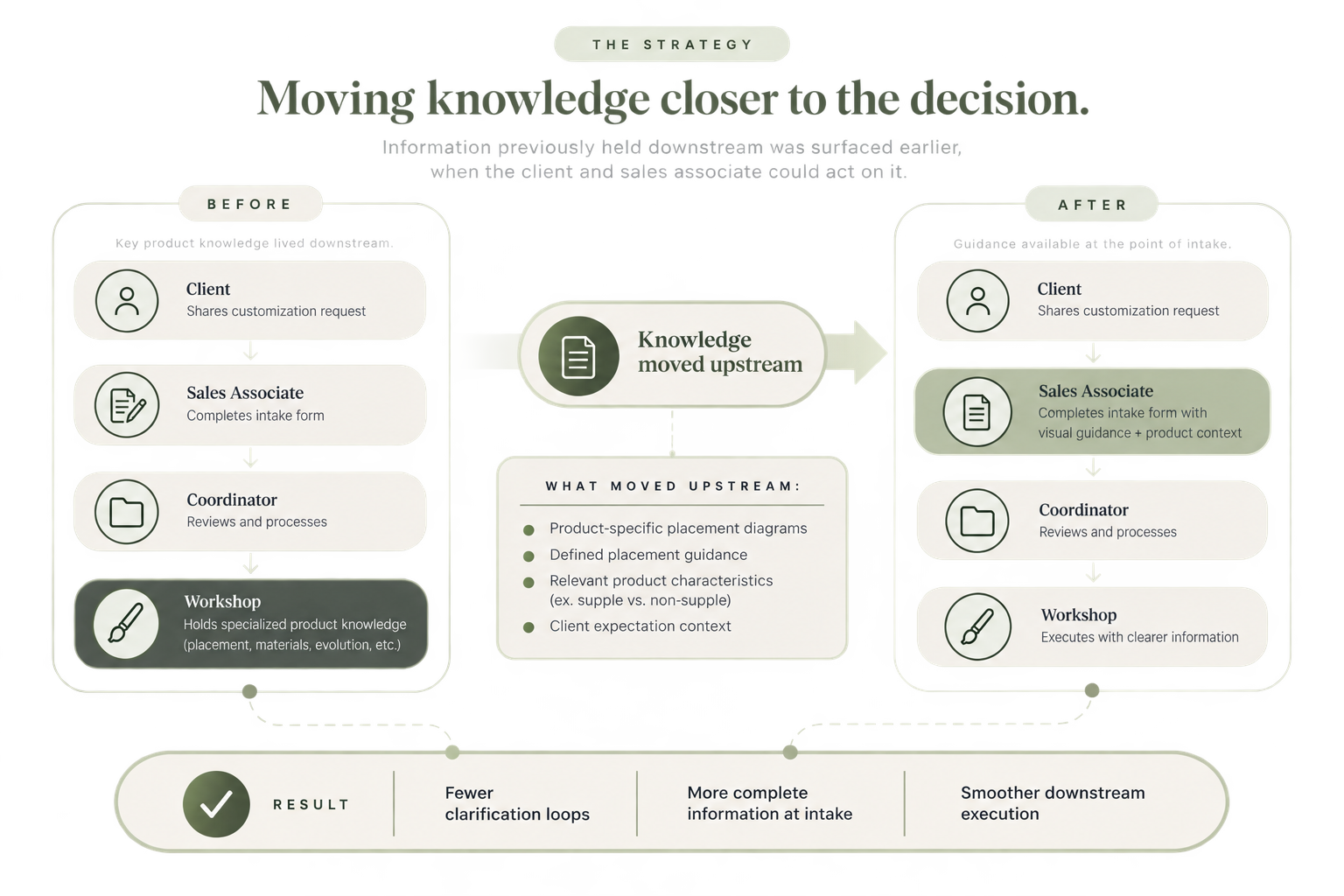
This revealed an opportunity to move relevant workshop knowledge upstream to the point where the request was originally captured.
The Approach
Improve the points of ambiguity without rebuilding the entire process.
The existing form structure didn't need to be replaced.
Instead, I focused on the areas where additional context could improve the quality of the information moving downstream.
Product-specific diagrams
I created visual diagrams for individual products so placement could be communicated spatially rather than relying solely on written descriptions.
Defined placement guidance
I clarified applicable placement options, giving sales associates and clients a clearer reference when documenting the request.
Contextual product information
I surfaced select product characteristics that could affect the customization experience and client expectations.
For example, identifying relevant material or construction characteristics allowed sales associates to better understand when certain products may naturally evolve more quickly and communicate those expectations appropriately.
This moved specialized knowledge closer to the moment it was needed.
Why Visual Guidance Mattered
Some information is inherently difficult to communicate through words.
A written description of placement may seem clear to the person documenting it while still leaving room for interpretation by someone seeing the request later.
Adding product-specific diagrams created a shared visual reference between the client, sales associate, coordinator, and workshop.
Instead of each stakeholder independently interpreting a description, they could reference the same representation.
[BEFORE / AFTER FORM VISUAL HERE]
The goal wasn't to redesign the form itself. It was to strengthen the information moving through it.
Working Within the Existing System
One of the important decisions in this project was determining what not to change.
The existing forms were already embedded in the sales and workshop process. Reorganizing fields or introducing an entirely new workflow would have created additional change without necessarily addressing the source of the problem.
I therefore kept the underlying structure intact and made targeted improvements to the areas producing ambiguity.
This allowed the solution to improve information quality while remaining familiar to the people already using the process.
Impact
I don't attribute broader changes in workshop lead time solely to this initiative, as several operational improvements occurred during the same period.
The more direct impact was an improvement in the quality and consistency of information entering the workshop.
The updated guidance helped:
Reduce ambiguity around product-specific placement
Give stakeholders a shared visual reference
Surface relevant product information earlier in the process
Support clearer communication with clients at the point of sale
Reduce preventable downstream clarification
Make specialized workshop knowledge more accessible to sales teams
What I Learned
Working at the downstream end of a process gives you a unique view of where upstream decisions create friction.
This project taught me that improving a workflow doesn't always require rebuilding it.
Sometimes the better intervention is much smaller: identify where information is being lost, determine what people need at that moment, and introduce the right context at the point of decision.
The goal isn't to redesign everything. The goal is to change the part of the system creating the friction.